
Content Settings
Format As
The Jobs Listing widget can display job listings as either an unordered list of jobs, or as a table. Use this setting to switch between the two.
Job Fields
The content and information displayed for each job listing is determined by the job fields selected using this setting.
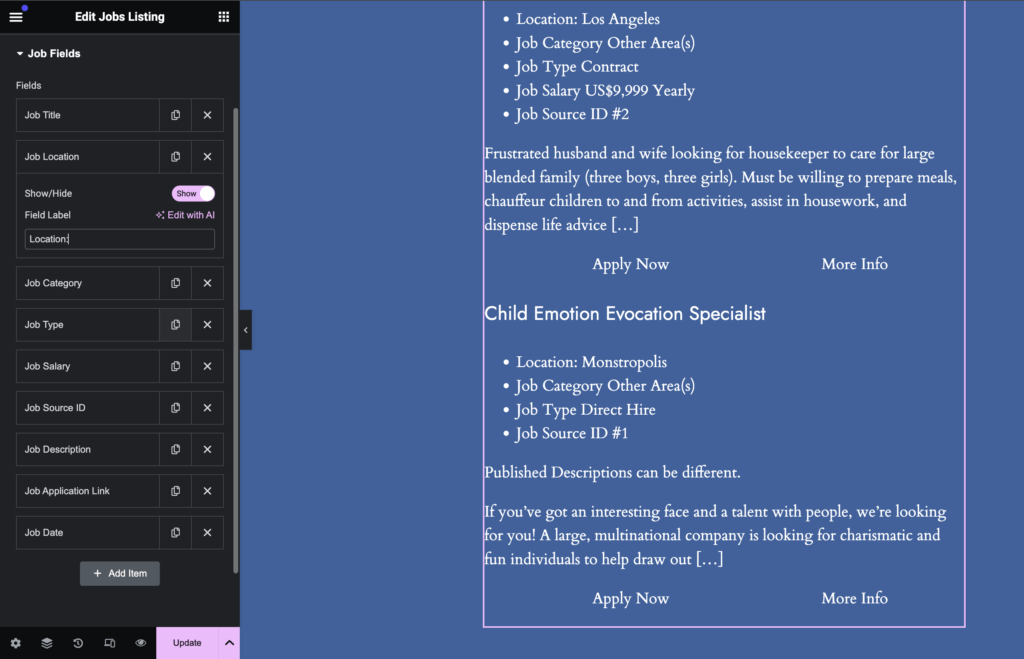
The order in which the fields are displayed for each job can be modified by dragging and dropping each of the field items in the settings to re-order them. You can also use the Show/Hide toggle to choose if a job field should be displayed or not. Finally, the label input can be left blank to omit a label, or filled in to prefix the job field with a label of your choice.
Style Settings
The style settings for the Job Listings widget are divided up into different section to allow easy styling of the different elements of the job listings:
- Container Styles – for styling both the overall container of all the job listings, and each individual job listing element’s container.
- Job Title Styles – for styling the job titles
- Job Info Styles – for styling the job metadata list
- Job Description Styles – for styling the job description text
- Job Navigation Styles – for styling the job navigation links
Use Cases
The primary use for this widget is to present the jobs on your jobs archive or search results page – it’s the widget that makes your job board, a job board.