
The Jobs Search Widget is for adding search inputs to your site. Typically you would do this on the jobs archive, but it can also be placed elsewhere as a standalone search input which will render results on the jobs archive
Content Settings
Search Fields
This widget can be configured to display any or all of 6 default fields:
- Keyword
- Category
- Location
- Type
- ID
- Reset
The order in which the fields are displayed can be customised by dragging and dropping the fields in the ‘Search Fields’ control:
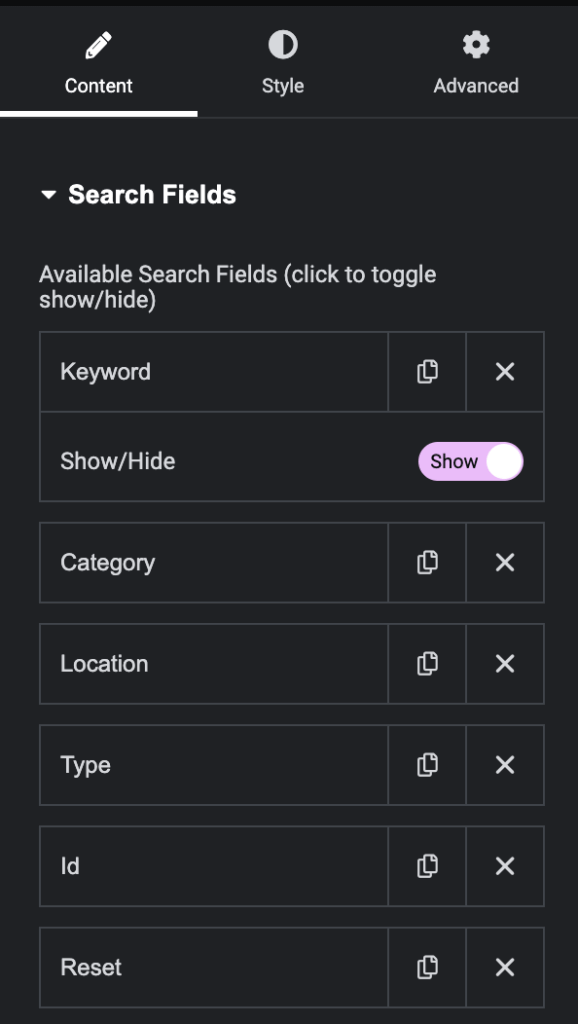
Additionally, each field can be toggled on or off using it’s show/hide toggle.
Style Settings
The widget inherits styles from your WordPress theme by default. However, if the default styles don’t align with your design preferences, you can fully customize the appearance of the Jobs Search widget. This includes adjusting fonts, colors, spacing, and other CSS properties to ensure that the widget integrates seamlessly with your site’s design.
Use Cases:
- On Archive Pages:
Typically this widget would be used on a jobs archive / search page so users can search among all your job listings to find those that suite their selection criteria. - On Your Landing Page(s):
Another common use of the Jobs Search widget is on your site’s landing / home page, included above the fold as part of a ‘call to action’ (CTA): this way candidates are encouraged to search jobs that suit their criteria as soon as they arrive on your site.