
Some Context
Many of Matador Jobs’ clients have asked us to implement recruiter profiles in the past, so many in fact that we have now created an extension plugin to be able to easily add this functionality to a site without the need for custom code and the intervention of a developer: it’s called Matador Jobs Pro Recruiter Profiles. If you’ve got an active All Access subscription to Matador Jobs you can download the extension from your account page here.
However, there are a number of clients for whom we have implemented recruiter profiles over the years using custom code; if you were led here by an admin notice in your WordPress Admin Dashboard, then what follows is just for you!
Why do this upgrade?
There are two main reasons to replace any existing custom code implementation of recruiter profiles in Matador Jobs with the Recruiter Profiles Extension:
- To prevent any (admittedly rather unlikely) clashes between the existing custom code and the code in the extension which would produce the kind of nasty errors that knock sites offline.
- To get ongoing easy access to updates, including new features, security patches and any other general future improvements.
How to Upgrade?
Locate the Custom Code
The custom code for recruiter profiles is usually located in your active theme or child theme as a file called ‘recruiters.php’ sometimes found in the ‘matador’ subdirectory. For example: wp-content/themes/custom-recruiter-profiles-example/matador/recruiters.php
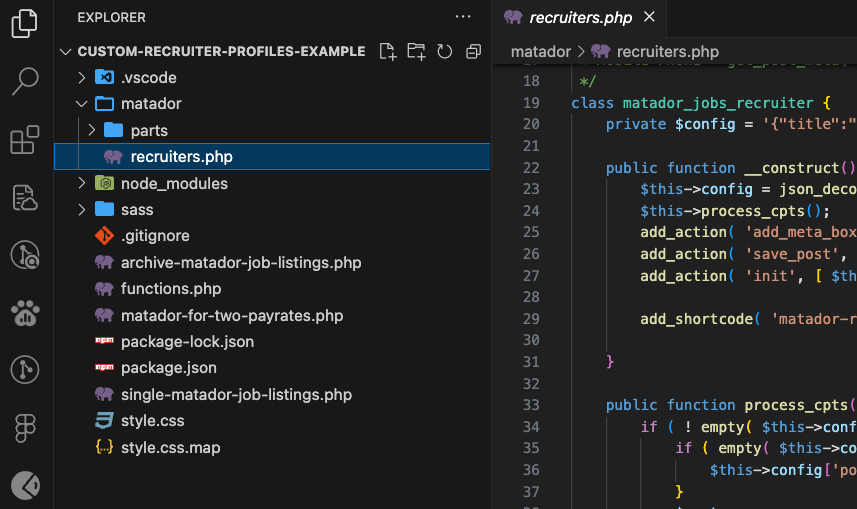
Find where is being loaded
This is will be load using a little bit of code like this
include( 'recruiters.php' );This will probably be in the functions.php of the theme.
Remove the Custom Code
Simply you will have to edit the file find the “include” line and delete it.
Now reload the page on your site where you were seeing the warning message asking you to remove the custom code. This message should no longer appear.
Then delete the file ‘recruiters.php’. This will remove the ‘matador_jobs_recruiter’ class which acts as a container for all the custom code for the recruiter profiles.
Atypical Installations
It may be the case that the custom code for recruiter profiles was implemented slightly differently to the file structure outlined above, and so there is either no recruiters.php file to delete, or not all of the custom code for recruiter profiles is confined to this file.
In this case we’ll need to dig a little deeper into the code to find where the custom code has been put and remove it.
Most code editors & IDE’s have a global search feature that will enable you to search through all the code in your theme. Use this search functionality to look for the following:
- ‘matador_jobs_recruiter’
- ‘matador-recruiter-profile’
These are the name of a class and of a shortcode respectively, and are the values used by the extension to detect the presence of custom code. You will need to remove the code that is definining the class ‘matador_jobs_recruiter’.
Typically the code defining the shortcode ‘matador-recruiter-profile’ is contained within the ‘matador_jobs_recruiter’ class, so removing the class will also remove the code defining the shortcode. If this is not the case you will also need to locate and remove the definition of the shortcode.