
RankMath
If you’re using Matador Jobs with RankMath for SEO, you can easily customize your meta titles and descriptions to include key job data, such as job titles, locations, and salaries. This guide will show you how to set it up for both single job listings and archive pages.
Step 1: Access Rank Math Settings
- Navigate to Rank Math in your WordPress dashboard.
- Go to Titles & Meta and select Job Listings.
Here, you can configure how your meta titles and descriptions will appear for job listing pages. Rank Math’s interface allows you to insert dynamic data, which makes it easy to include specific job details.
Step 2: Customize Meta Titles and Descriptions
Rank Math offers a range of variables that can be used to pull in dynamic data for job listings. This is particularly useful for improving SEO by making your meta titles and descriptions more specific and relevant.
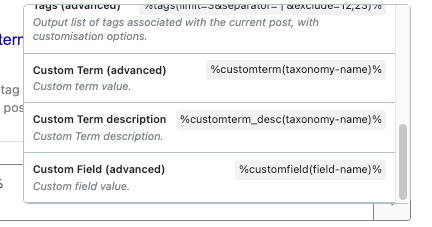
Example 1: Meta Title with Job Title and Location
- Meta Title Template: “Become a {Job Title} in {Job Location}”
- Rank Math Setting:
Become a %title% in %customterm(matador-locations)% - Result: “Become a Starship Captain in London”
This configuration pulls the job title and location from your Matador Jobs data and integrates it into your meta title.
Example 2: Meta Title with Salary and Job Title
- Meta Title Template: “Earn {Salary} as a {Job Title}”
- Rank Math Setting:
Earn %customfield(salary_string)% as a %title% - Result: “Earn $50,000 Yearly as a Starship Captain”
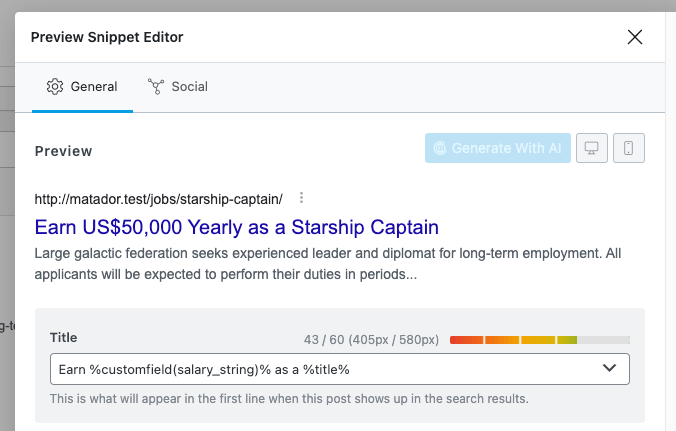
In this example, the salary information stored in a custom field is dynamically added to the meta title.
By customizing your meta titles and descriptions in this way, you not only make your job listings more appealing to search engines, but also more engaging to potential candidates.
Rank Math’s documentation on this can be found here
Yoast
Step 1: Access Yoast Settings
In your WordPress dashboard, go to Yoast SEO and click on Settings.
Next, navigate to Content Types and select Job Listings.
This section allows you to configure the meta titles and descriptions for your job listing pages, using Yoast’s intuitive interfaceows you to insert dynamic data, which makes it easy to include specific job details.
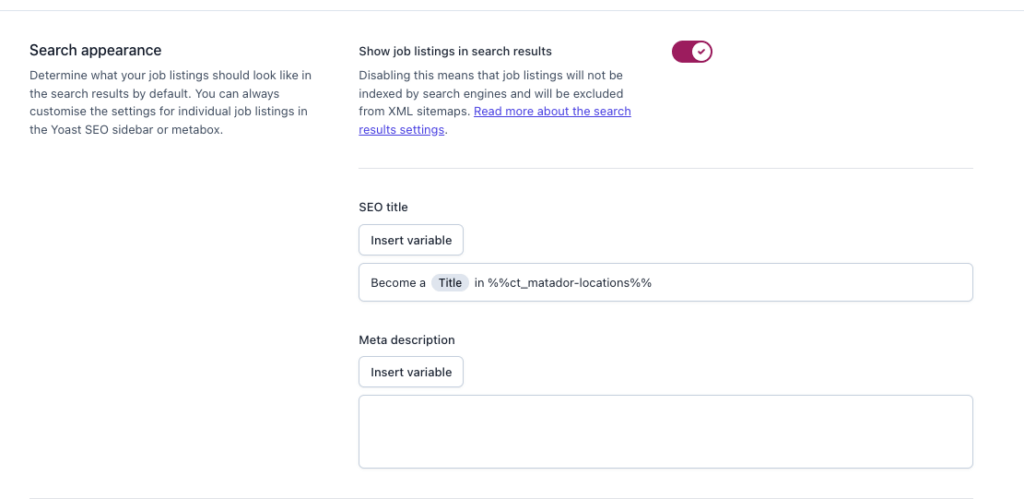
Step 2: Customize Meta Titles and Descriptions
Yoast provides several variables that allow you to insert dynamic job data into your meta titles and descriptions. This is a powerful way to enhance SEO by making your content more relevant and specific.
Example 1: Meta Title with Job Title and Location
- Meta Title Template: “Become a {Job Title} in {Job Location}”
- Yoast Setting:
Become a %%title%% in %%ct_matador-locations%% - Result: “Become a Starship Captain in London”
This setup pulls in the job title and location from your Matador Jobs data and dynamically includes them in the meta title.
Example 2: Meta Title with Salary and Job Title
- Meta Title Template: “Earn {Salary} as a {Job Title}”
- Yoast Setting:
Earn %%cf_salary_string%% as a %%title%% - Result: “Earn $50,000 Yearly as a Starship Captain”
Here, salary data from a custom field is automatically included in the meta title, making your job listings more appealing to search engines.
Customizing meta titles and descriptions in this way not only improves SEO but also makes your job listings more engaging for potential candidates.