
If you use salary for fulltime roles and pay rate for contract roles in Bullhorn, and want to have pay ranges for both. Then you need to add some code to set this up.
First, you’ll need to determine a criteria which can be used to determine if a job should use the pay rate or salary fields. In this guide we’ll use the salary unit set on the job in Bullhorn. Our logic for which fields to use will be as follows:
- If the job’s salaryUnit field is anything other than ‘yearly’ then we’ll use payRate as the salary range low field, and customFloat1 for the salary range high field.
- If the job’s salaryUnit field is ‘yearly’ then we’ll use salary as the salary range low field and customInt1 as the salary range high field.
Once you’ve defined your own logic for setting the fields, go to the Job Listings tab in Matador’s settings and set the salary range low and high fields to the payRate fields. So for this example I’ll be setting them to payRate and customFloat1 respectively.
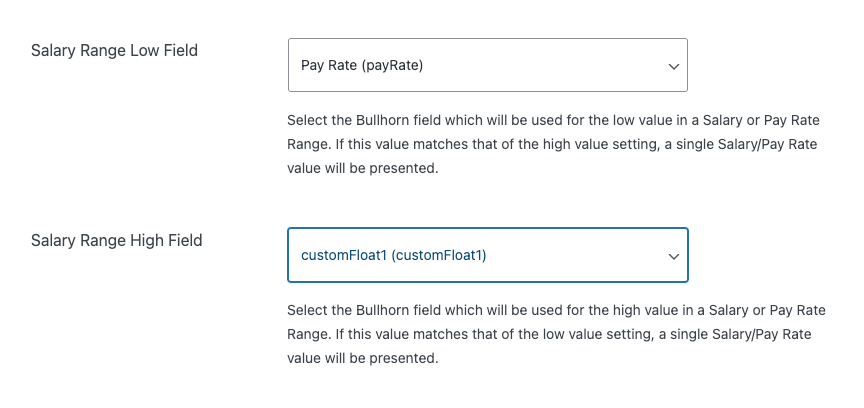
Then add this code to your site/(functions.php) and adjust the code to your own logic:
<?php
/**
 * Plugin Name: Matador Jobs Hourly/Salary Pay
 * Plugin URI:  https://matadorjobs.com
 * Description: Customizations for Matador Jobs
 * Version:     2023.04.24
 * Author:      Matador Software LLC, Jeremy Scott, Paul Bearne
 * Author URI:  https://matadorjobs.com
 * License:     GPL-3.0+
 * License URI: http://www.gnu.org/licenses/gpl-3.0.txt
 */

use matador\Helper;
use matador\Matador;

add_action( 'matador_bullhorn_import_save_job', 'custom_matador_bullhorn_import_save_job_salary', 27, 2 );
/**
 * Save Job Salary
 *
 * @since 2023-04-25
 *
 * @param stdClass $job
 * @param int      $wpid
 *
 * @return void
 */
function custom_matador_bullhorn_import_save_job_salary( $job = null, $wpid = null ) {

	if ( empty( $job->salaryUnit ) || ( 'per year' !== strtolower( $job->salaryUnit ) ) ) {
        // If the salary unit is anything other than yearly, early exit as we want the default fiels set in settings to be used to set the salary data on the job
		return;
	}

	if ( empty( $job->salary ) ) {

		return;
	}

	// Instantiate an array to hold our new/updated Post Meta
	$meta = [];

	/**
	 * Salary Range Separator
	 * @wordpress-filter
	 */
	$range_separator = apply_filters( 'matador_bullhorn_import_salary_range_separator', ' - ' );

	/**
	 * Salary Unit Separator
	 * @wordpress-filter
	 */
	$unit_separator = apply_filters( 'matador_bullhorn_import_salary_unit_separator', ' ' );

	$meta['salary_currency'] = get_post_meta( $wpid, 'salary_currency', true );

	$salary_low_setting  = 'salary';
	$salary_high_setting = 'customFloat1';

	// New installs and new upgrades to 3.8.4 can have no value here, so set to default
	if ( ! $salary_low_setting ) {

		return;
	}

	$salary_low_value  = ( 0 === (int) $job->$salary_low_setting || ! empty( $job->$salary_low_setting ) ) ? (float) $job->$salary_low_setting : false;
	$salary_high_value = ! empty( $job->$salary_high_setting ) ? (float) $job->$salary_high_setting : false;

	if ( false !== $salary_high_value && false !== $salary_low_value && $salary_low_value > $salary_high_value ) {
		$temp = $salary_low_value;
		$salary_low_value = $salary_high_value;
		$salary_high_value = $temp;
		unset( $temp );
	}

	if ( false !== $salary_high_value && false !== $salary_low_value ) {

		$meta['salary_low_value']     = $salary_low_value;
		$meta['salary_low_formatted'] = Helper::format_currency( $salary_low_value, $meta['salary_currency'] );

		$meta['salary_high_value']     = $salary_high_value;
		$meta['salary_high_formatted'] = Helper::format_currency( $salary_high_value, $meta['salary_currency'] );

		if ( ! $meta['salary'] ) {
			$meta['salary']           = $salary_high_value;
			$meta['salary_formatted'] = $meta['salary_high_formatted'];
		}

		if ( $salary_high_value === $salary_low_value ) {
			$meta['salary_string'] = $meta['salary_high_formatted'];
		} else {
			$meta['salary_string'] = $meta['salary_low_formatted'] . $range_separator . $meta['salary_high_formatted'];
		}

		$meta['salary_string'] .= ( ! empty( $meta['salary_string'] && $job->salaryUnit ) ) ? $unit_separator . $job->salaryUnit : '';

	} elseif ( ! $meta['salary'] && ( false !== $salary_high_value || false !== $salary_low_value ) ) {

		$salary = $salary_high_value ?: $salary_low_value;

		if ( 0 !== (int) $salary ) {
			$meta['salary']           = $salary;
			$meta['salary_formatted'] = Helper::format_currency( $salary, $meta['salary_currency'] );
			$meta['salary_string']    = $meta['salary_formatted'] . ( $job->salaryUnit ) ? $unit_separator . $job->salaryUnit: '';
		}
	}

	/**
	 * Formatted Salary String
	 *
	 * @wordpress-filter
	 */
//	$meta['salary_string'] = apply_filters( 'matador_bullhorn_import_salary_string', $meta['salary_string'], $meta );

	foreach ( $meta as $key => $val ) {
		if ( 0.0 === $val || ! empty( $val ) ) {
			/**
			 * @wordpress-filter Matador Import Save Job Meta
			 *
			 * @see Bullhorn_Import::save_job_meta() for documentation
			 */
			update_post_meta( $wpid, $key, apply_filters( 'matador_save_job_meta', $val, $key, $wpid ) );
		}
	}
}
Now (re)import some of your jobs to test that everything is working as you need it to!